Poetry Writing Hub Notion Template
The home your poems have been waiting for Poets are notorious for keeping work in approximately seventeen places at once. The good draft lives in a notebook from 2019. The almost-finished one is in the Notes app.
About Poetry Writing Hub Notion Template
The home your poems have been waiting for
Poets are notorious for keeping work in approximately seventeen places at once. The good draft lives in a notebook from 2019. The almost-finished one is in the Notes app. The submission you swore you'd send is on a sticky note that has since gone missing, possibly eaten by the cat. The publication you wanted to query is a tab you closed three weeks ago.
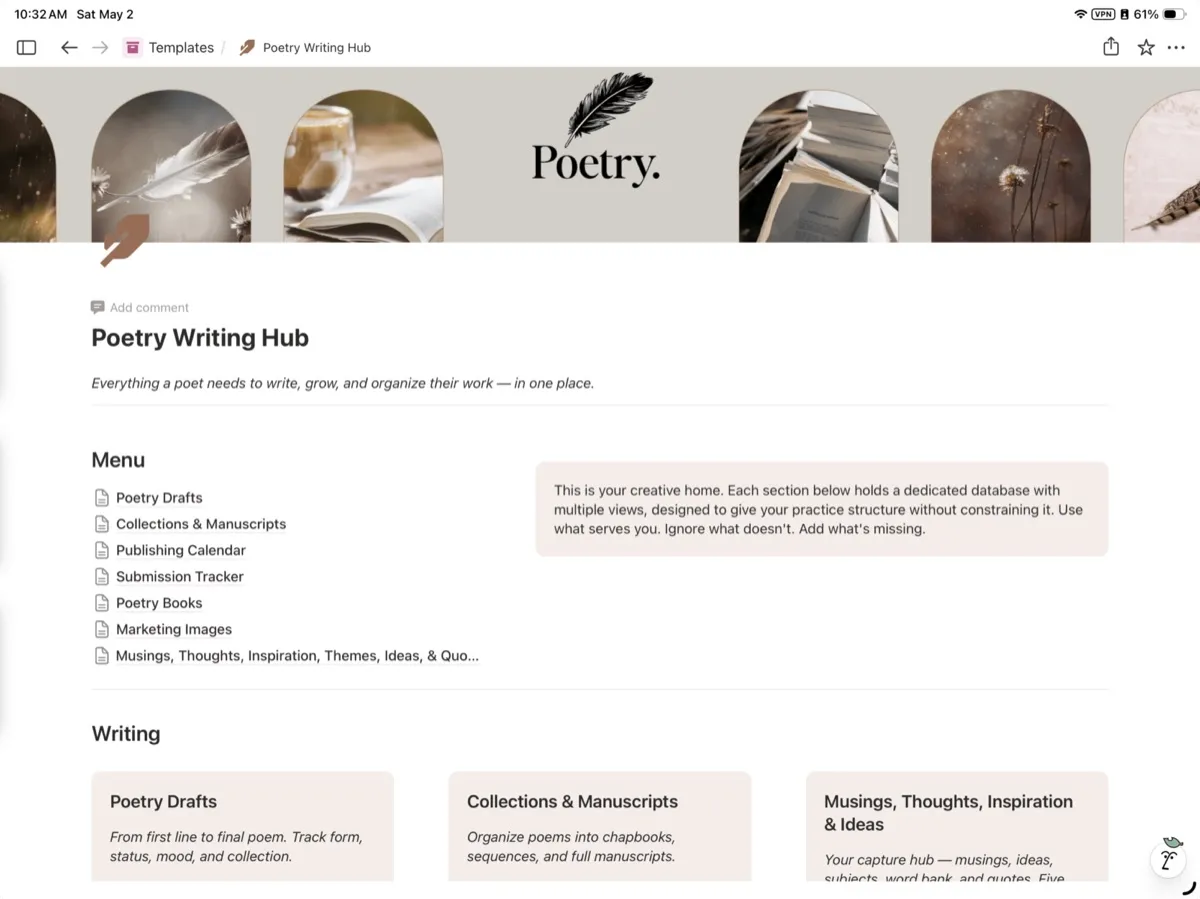
The Poetry Writing Hub pulls all of it into one fully built Notion workspace, designed specifically for the way poets actually work—messy, layered, recursive, and wildly nonlinear.
One dashboard. Every poem, every draft, every revision, every submission, every literary magazine you've ever bookmarked at midnight. Built for poets who write seriously, even when they don't yet call themselves serious about it.
What's inside
A poem database that respects the process. Every poem gets its own page with drafts stacked in order, revision notes, form, line count, themes, and status (draft, revising, finished, retired, sent out). Filter by anything. Find anything in seconds. The poem you wrote last spring stops being a ghost.
A collection and chapbook builder. Group poems into collections, themed sequences, chapbook drafts, or full manuscripts. Reorder by drag-and-drop. Track which poems have been previously published and where, so you never accidentally double-submit a piece to a journal that already ran it.
A literary magazine and publication tracker. A built-in database of journals, magazines, and contests with fields for submission windows, reading fees, payment, response times, simultaneous submission policies, tier (dream / mid-tier / building credits), and personal notes. Add to it as you discover new markets. The dream-list and the realistic-list living side by side.
A submission tracker that actually tracks submissions. Log every poem sent out, where it went, when it went, the response, the rejection note, and which pieces are currently out the door. See at a glance what's pending, what came back, and what's ready to circulate again. The "wait, did I already send this?" panic ends here.
A prompt vault and generator. A library of poetry prompts organized by mood, form, season, and theme—plus space to add your own. For mornings when the brain is willing but the page is staring back blankly.
A form and craft reference library. Quick references for sonnet, villanelle, sestina, pantoum, ghazal, prose poem, haibun, and free verse structures. Plus space to save craft articles, interviews, and lecture notes you actually want to revisit.
A reading log built for poets. Track full collections and individual poems, save lines worth keeping, note influences, and build a running record of what's shaping the work. Your literary lineage, organized.
A revision and process journal. Capture the why behind the cuts, the breakthrough on the seventh draft, the version you almost killed before it became the best one. Helpful for chapbook intros, interviews, and remembering how the work got made.
A goals and submissions calendar. Quarterly and annual targets for new poems, submissions sent, and journals queried. Built for steady output, not sprint culture.
An idea and fragment vault. Every overheard line, weird image, half-thought, and shower-revelation in one searchable place. Fragments stay fragments until they decide to grow into poems.
A finished poems archive. A clean, scrollable record of the finished work, organized by year, theme, or collection. The body of work, finally visible to its maker.
Who it's built for
Poets working toward a chapbook or first collection. Poets submitting to journals seriously, or wanting to start. MFA students juggling workshop drafts, thesis poems, and a submissions calendar. Long-time poets with twenty years of work scattered across notebooks, hard drives, and a graveyard of Word docs. Hobbyists who want to take the practice more seriously without buying eight different apps to do it.
If poems live everywhere except in one place, this is the fix.
What you get
A fully built Notion template, instantly duplicatable to any free or paid Notion account. Pre-populated databases, linked views, sample entries to show how everything connects, and clear setup instructions. No subscriptions, no add-ons, no upsells. Duplicate once. Use forever.
Why it works
Most poetry advice tells writers to stay in the romance of it—the candle, the notebook, the moody window. That part's lovely. The Poetry Writing Hub handles everything else: the tracking, the submitting, the remembering, the building toward a body of work that actually exists somewhere outside the writer's head.
The poems get to stay sacred. The system runs the business of being a poet.
Invest in the Collection.
Bring the poems home.
- Made inNotion templates
- Price$30, paid once
Made by a writer.Bought once.Used the same day.Billed monthly.
You do not need another course about content. You need the page in front of you to stop being blank, and you need it to look like someone with taste made it.
Everything in the shop comes from the same desk: built for my own books, clients, and newsletters first, then cleaned up and put on the shelf.
Designed with the same type and restraint as the rest of the studio, so your work looks edited.
Yours to change. Swap the fonts, the colors, the order. Nobody is checking.
No member area to learn, no dashboard. A file and a link.
Priced like a tool, because that is what it is.
How it works
Three steps, in this order, and then you are back at your desk.
- № 1
Pay once at checkout
Card or Apple Pay. Your account is made for you from the email you pay with.
- № 2
Get the link by email
Your download arrives as soon as the payment clears, and it stays in your account.
- № 3
Duplicate it into Notion
One click copies the workspace. Fill in your own publication and start planning.
Questions, answered
What do I need to use this?
A Notion account. Your download includes a link that duplicates the whole workspace into your own.
How do I get my files?
A download link is emailed to you right after checkout, and your files stay in your account.
Is this a subscription?
No. You pay once and the files are yours.
Something went wrong with my download.
Write to me with your order email and it gets sorted by a person.