Thought Leader Dashboard Notion Template
Thought Leader Dashboard — WooCommerce Listing Short Description A Notion dashboard for thought leaders who want their content to come from somewhere real.

Inside the template
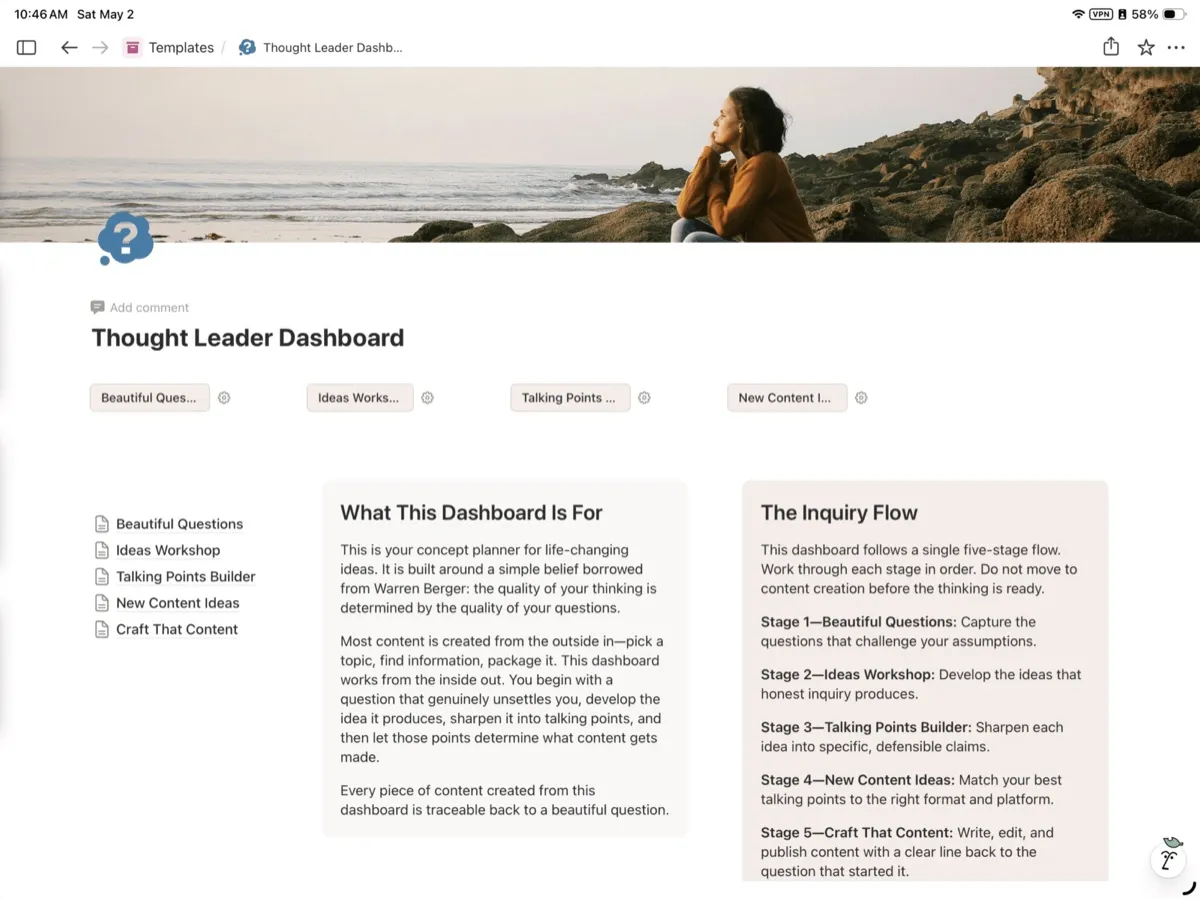
- The five-stage inquiry flow as a connected, linked-database system, not five separate pages
- A Beautiful Questions capture space designed for fragments, not finished thoughts
- An Ideas Workshop with prompts for developing a question into a position
- A Talking Points Builder for turning positions into claims that can stand on their own
- A New Content Ideas hub that maps points to formats and platforms
- A Craft That Content workspace with traceability back to the originating question
- Instructions for how the flow is meant to be used, including what to resist
About Thought Leader Dashboard Notion Template
Thought Leader Dashboard — WooCommerce Listing
Short Description
A Notion dashboard for thought leaders who want their content to come from somewhere real. Built around a five-stage inquiry flow that turns beautiful questions into ideas, ideas into talking points, and talking points into content with a clear line back to the question that started it.
Long Description
The Thought Leader Dashboard is a concept planner for life-changing ideas, built in Notion and designed around a single belief borrowed from Warren Berger: the quality of your thinking is determined by the quality of your questions.
Most content gets made from the outside in. You pick a topic, find information about it, package it, and post it. The result is content that exists, but it does not carry weight. It does not change anyone's mind, including yours.
This dashboard works from the inside out. You begin with a question that genuinely unsettles you, develop the idea it produces, sharpen it into specific talking points, and then let those points determine what content gets made and where it gets published. Every piece of content you create from this dashboard is traceable back to a beautiful question—which is exactly why it lands differently than the content everyone else is publishing.
The Inquiry Flow
The dashboard follows one five-stage flow. You work through each stage in order, and you do not move to content creation before the thinking is ready.
Stage 1—Beautiful Questions. Capture the questions that challenge your assumptions. Not topic ideas. Not headlines. Real questions that reframe a problem, challenge an assumption, or open a possibility that was previously invisible to you.
Stage 2—Ideas Workshop. Develop the ideas that honest inquiry produces. This is where a question becomes a position, a perspective, or a fresh framing of something the rest of your industry has stopped looking at carefully.
Stage 3—Talking Points Builder. Sharpen each idea into specific, defensible claims. Vague convictions do not travel. Sharp claims do.
Stage 4—New Content Ideas. Match your best talking points to the right format and the right platform—long-form, short-form, video, audio, email, post, essay—based on what each point is built to do.
Stage 5—Craft That Content. Write, edit, and publish, with a clear line back to the question that started the chain. By the time you reach this stage, the hardest part is already done.
Why Questions Come First
Most people start with what they want to say. Warren Berger argues we should start with what we do not yet understand. Questions are not a warm-up before the real work begins—they are the real work. The dashboard treats them that way, structurally, by refusing to let you skip ahead.
A beautiful question reframes a problem, challenges an assumption, or surfaces a possibility that was invisible the moment before. When your content starts there, it carries a different quality of thinking, and your audience can feel the difference even when they cannot name it.
Who This Is For
Thought leaders, founders, writers, coaches, consultants, creators, and operators who are tired of producing content that exists but does not say anything. If you have ever finished a post and felt that it was technically fine but spiritually empty, this dashboard is built for you.
It works whether you publish daily or quarterly, whether your audience is fifty people or fifty thousand, and whether you write essays, scripts, posts, podcasts, or all of the above.
What's Inside
A Notion template containing:
- The five-stage inquiry flow as a connected, linked-database system, not five separate pages
- A Beautiful Questions capture space designed for fragments, not finished thoughts
- An Ideas Workshop with prompts for developing a question into a position
- A Talking Points Builder for turning positions into claims that can stand on their own
- A New Content Ideas hub that maps points to formats and platforms
- A Craft That Content workspace with traceability back to the originating question
- Instructions for how the flow is meant to be used, including what to resist
How to Use It
Duplicate the template into your own Notion workspace. Start at Stage 1. Do not skip ahead. The flow is the product—the structure protects the thinking from being shortcut.
Format & Delivery
Delivered as a Notion template link. Requires a free Notion account. Instant access after purchase.
- Made inNotion templates
- Price$30, paid once
Made by a writer.Bought once.Used the same day.Billed monthly.
You do not need another course about content. You need the page in front of you to stop being blank, and you need it to look like someone with taste made it.
Everything in the shop comes from the same desk: built for my own books, clients, and newsletters first, then cleaned up and put on the shelf.
Designed with the same type and restraint as the rest of the studio, so your work looks edited.
Yours to change. Swap the fonts, the colors, the order. Nobody is checking.
No member area to learn, no dashboard. A file and a link.
Priced like a tool, because that is what it is.
How it works
Three steps, in this order, and then you are back at your desk.
- № 1
Pay once at checkout
Card or Apple Pay. Your account is made for you from the email you pay with.
- № 2
Get the link by email
Your download arrives as soon as the payment clears, and it stays in your account.
- № 3
Duplicate it into Notion
One click copies the workspace. Fill in your own publication and start planning.
Questions, answered
What do I need to use this?
A Notion account. Your download includes a link that duplicates the whole workspace into your own.
How do I get my files?
A download link is emailed to you right after checkout, and your files stay in your account.
Is this a subscription?
No. You pay once and the files are yours.
Something went wrong with my download.
Write to me with your order email and it gets sorted by a person.